Client-side rendering mod for Minecraft: Java Edition

Entity Culling Mod skips the mobs and chests you can't see

Entity Culling traces what is actually visible from your camera and stops the game from drawing entities and block entities hidden behind solid blocks. Busy bases, farms and storage rooms get lighter to render.

Loaders
Fabric, Forge, NeoForge
Runs on
Your client only
Developer
tr7zw
Diagram of Entity Culling: a camera traces lines to blocks; entities behind a wall are skipped while visible ones are rendered

What is the Entity Culling mod?

Entity Culling is a performance mod for Minecraft: Java Edition, created by tr7zw. It works out which entities and block entities are hidden from your view and skips rendering them.

Vanilla Minecraft already avoids drawing chunks you cannot see, but individual mobs, item frames, chests and signs behind a wall can still go through the rendering process. Entity Culling adds a visibility check for these objects. The check runs on a separate thread, so the main game loop does not wait for it.

Nothing changes on the server side. Mobs keep moving, farms keep running, and other players see exactly what they saw before. The only difference is what your own client spends time drawing.
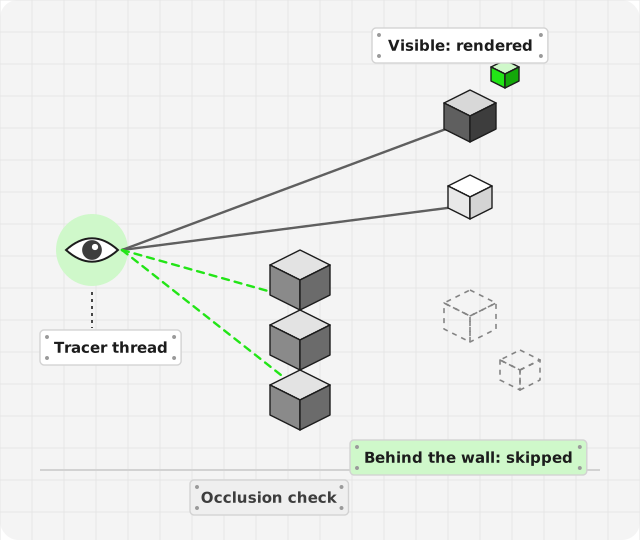
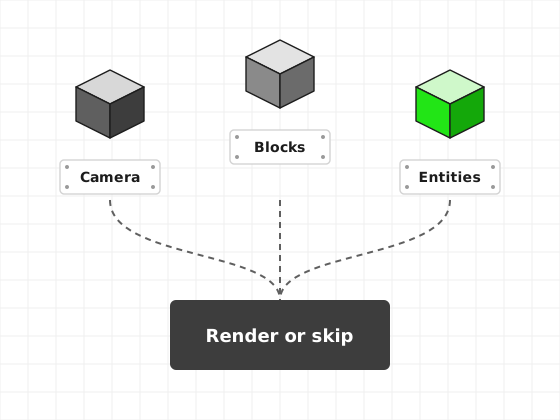
Diagram: camera position, surrounding blocks and entities combine into a single render-or-skip decision
  1. Camera where you are looking from
  2. Blocks the solid geometry in between
  3. Entities mobs and block entities nearby

Entity Culling features

One core idea, a visibility check, with a handful of parts built around it.

Visibility tracing on its own thread

For nearby entities and block entities, the mod traces from your camera through the surrounding blocks. If every path is blocked by solid geometry, that object is marked hidden and skipped when the frame is drawn.

Because tracing runs asynchronously, the main render thread is not held up waiting for results.

Hidden mobs are skipped

Animals in pens, mobs in farms and villagers in closed rooms are not drawn while walls block them.

Block entities too

Chests, signs, banners and similar blocks with special rendering are covered, which matters in storage-heavy bases.

Client-side only

Install it on your game. Servers do not need it, and gameplay is not changed.

Whitelists

Objects whose visuals reach beyond their block, such as beacons, can be excluded from culling in the config.

Several loaders

Builds have been published for Fabric, Forge and NeoForge. Which loaders exist varies by game version.

Optional tick culling

In versions that include the option, hidden entities can also skip some client-side ticking work. Check your config file to see whether your build has it.

How Entity Culling works for you

Four stations from file to game. The detailed procedure is in the setup section below.

  1. 1

    Download

    Get a build for your exact Minecraft version and loader, or the source archive if you plan to build it.

  2. 2

    Install

    Set up Fabric, Forge or NeoForge, launch once, and place the jar in the mods folder.

  3. 3

    Configure

    Optional. Edit the config file created on first launch, for example to whitelist objects.

  4. 4

    Launch

    Start the loader profile and play. Hidden entities are skipped in the background.

Installing Entity Culling

  1. Install a mod loader

    Run the Fabric, Forge or NeoForge installer for your game version. Each creates its own launcher profile.

  2. Create the mods folder

    Start the new profile once and close the game. The loader creates .minecraft/mods, or a mods folder inside your launcher's instance directory.

  3. Add dependencies if listed

    Some builds declare dependencies, for example Fabric API on Fabric. Add them to the same folder.

  4. Copy the Entity Culling jar

    Place the jar in the mods folder. Do not unzip it. A ZIP of the repository is source code and needs to be built first.

  5. Launch and check

    Start the game with the loader profile. The config file appears in config, typically as entityculling.json.

Entity Culling compatibility

Loader and version support differs between releases. Rows marked "Check file list" mean you should confirm a build for your exact setup before installing.

Entity Culling compatibility by platform, loader and game version
Platform or version Status Notes
Minecraft: Java Edition Supported The mod is built for Java Edition clients.
Fabric Builds published Some builds list Fabric API as a dependency.
Forge Builds published Common in 1.20.1 modpacks.
NeoForge Newer versions Available for more recent game versions.
1.21.10 and 1.21.11 Check file list Recent 1.21 releases are the active focus. Use a file that names your exact version.
1.20.1 Builds published Pick the build for your loader.
1.12.2 and 1.7.10 Not confirmed here Verify in the project's own listings. See the older versions guide.
Bedrock Edition and MCPE Not supported Java mods cannot run on Bedrock. See the MCPE explainer.
Server install Not required Client-side mod. Installing it on a server is unnecessary.

Release information

Entity Culling is actively maintained, and new builds follow Minecraft updates. Version numbers and dates change too often to list reliably here, so this site does not publish them. The project's release listings are the source of truth.

Developer
tr7zw
Repository
tr7zw/EntityCulling on GitHub
File on this site
Main branch source archive (.zip)
Contents
Source code, built with Gradle
Compiled builds
Published through the project's release listings, such as Modrinth and CurseForge
Main branch target
Current development; may differ from your game version

Where Entity Culling helps

Storage rooms

Walls of chests, barrels with signs and labeled item frames are block entities. Most are out of sight at any moment, so there is plenty to skip.

Mob and animal farms

Enclosed farms keep many entities in one place. From outside the building, they are hidden, and the mod stops drawing them.

Large modpacks

Tech packs add machines and blocks with custom rendering. Culling hidden ones can reduce load in dense bases.

Crowded server hubs

Spawn areas and shops can be full of armor stands, item frames and signs behind walls. The mod works on your client even if the server does not have it.

Modest hardware

On laptops and older PCs, skipping wasted rendering work can matter more. Results depend on the scene, so measure in your own world.

Illustration of the Entity Culling source archive being downloaded

Download Entity Culling Mod

This button downloads the main branch of the Entity Culling repository from GitHub as a ZIP archive. It contains the mod's source code, which you can build with the project's Gradle setup.

  • FormatZIP source archive
  • ForMinecraft: Java Edition
  • LoadersFabric, Forge, NeoForge builds
Download Entity Culling Mod

Want a ready-to-use jar instead? Compiled builds for specific game versions are published in the project's release listings. The installation guide covers both routes.

Troubleshooting

Match what you see to the likely cause. The full troubleshooting guide goes into more detail.

Game crashes on launch

Build for another game version or loader

Replace it with the build that names your exact version and loader.

Mod missing from the Mods list

Wrong mods folder or profile

Open the mods folder of the profile you actually launch.

You have a ZIP, not a jar

Downloaded the source archive

Build it with Gradle, or use a compiled release instead.

Mobs pop in on fast turns

Tracing runs asynchronously

Brief pop-in is expected. Tracing options vary by version.

A beam or large model vanishes

Visuals extend past the block

Add the block or entity ID to the whitelist in the config.

No FPS difference

Few hidden entities in the scene

Test in a dense area with identical settings.

Entity Culling guides

Setup and version help on one side, fixes and comparisons on the other. See all guides

Setup and versions

Fixes and comparisons

Pros and cons of Entity Culling

Strengths

  • Client-side, with no server install and no gameplay changes
  • Skips rendering work for objects fully hidden behind blocks
  • Tracing runs off the main thread
  • Whitelists handle objects with oversized visuals
  • Commonly used alongside other performance mods

Limitations

  • Gains depend on the scene and can be small in open areas
  • Brief pop-in is possible during fast camera turns
  • Java Edition only, with no Bedrock or MCPE version
  • Builds must match your game version and loader exactly
  • The archive on this site is source code, not a jar

Entity Culling FAQ

Twenty answers in two tool groups. Pick a group, then open a question.

Setup and compatibility

Performance and gameplay